
[Blog] Velog 처럼 글 목록을 띄워보자
2023. 5. 28. 02:45
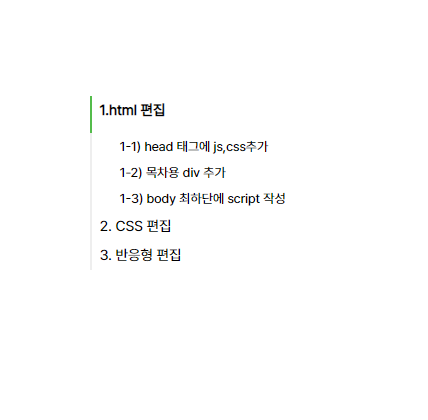
velog가 부러웠던 점 중 하나가 바로 '자동 목차 생성'이었다.
개인적으로 노션을 사용할 때에도 확장프로그램을 설치해서 노션 옆에 목차를 생성해서 사용하곤 한다.tocbot을 이용해서 티스토리 블로그에도 멋들어진 목차를 달아보자 👀
1.html 편집
1-1) head 태그에 js,css추가
    <head>
        <!--목차-->
        <script src="https://cdnjs.cloudflare.com/ajax/libs/tocbot/4.18.2/tocbot.min.js"></script>
        <link rel="stylesheet" href="https://cdnjs.cloudflare.com/ajax/libs/tocbot/4.18.2/tocbot.css">
</head>- 태그 안에 CDN으로 js, css를 호출한다.
1-2) 목차용 div 추가
<!--톡봇 목차 tocbot -->
<div class="toc"></div>- 나는 게시글 영역 (article_main 클래스) 위 쪽에 톡봇 목차를 달았다.
1-3) body 최하단에 script 작성
<body>
    ....

<!-- tocbot 목차 -->
        <!-- TOC -->
        <script>
                const contentBodySelector = '.contents_style'
            var content = document.querySelector(contentBodySelector)
            var headings = content.querySelectorAll('h1, h2, h3, h4, h5, h6, h7')
            var headingMap = {}

            Array.prototype.forEach.call(headings, function (heading) {
                    var id = heading.id ? heading.id : heading.textContent.trim().toLowerCase()
                                        .split(' ').join('-').replace(/[\!\@\#\$\%\^\&\*\(\):]/ig, '')
                    headingMap[id] = !isNaN(headingMap[id]) ? ++headingMap[id] : 0
                    if (headingMap[id]) {
                        heading.id = id + '-' + headingMap[id]
                    } else {
                        heading.id = id
                    }
                })

            tocbot.init({
                tocSelector: '.toc',
                contentSelector: contentBodySelector,
                headingSelector:'h1, h2, h3, h4',
                hasInnerContainers: false
            });

            $(document).ready(function(){
                $('.toc').addClass('toc-absolute');

                var toc_top = $('.toc').offset().top - 165;
                $(window).scroll(function() {
                    if ($(this).scrollTop() >= toc_top) {
                        $('.toc').addClass('toc-fixed');
                        $('.toc').removeClass('toc-absolute');
                    } else {
                        $('.toc').addClass('toc-absolute');
                        $('.toc').removeClass('toc-fixed');
                    }
                });
            });
        </script>
        <!-- tocbot -->
</body>- 현재 내가 사용하고 있는 스킨은 'simple_line'스킨 이기 때문에
const contentBodySelector = '.contents_style'를 적용했다.
(본인이 사용하는 스킨에 맞는 class를 작성하면 된다. class는 F12 개발자모드로 확인 ㄱㄱ ) - ❗ 추가해야 할 것이 바로
headingSelector:'h1, h2, h3, h4'이부분에서 h4태그도 넣어줘어야 티스토리의 제목 3 태그도 목차에서 보이게 된다.- why? 티스토리 제목 1, 제목 2, 제목 3은 h1, h2, h3가 아님
- 티스토리 (제목 1==h2 , 제목 2==h3, 제목 3 ==h4) 임을 잊지 말자.
2. CSS 편집
/* 목차 tocbot start--------- */
/* TOC */
.toc-absolute {
  position: absolute;
  margin-top: 0px;
}
/* 고정위치 */
.toc-fixed {
  position: fixed;
  top: 0px;
}


.toc {
  right: calc((100% - 850px) / 2 - 400px);
  width: 250px;
  padding: 10px !important;
  box-sizing: border-box;
}


.toc-list {
  margin-top: 10px !important;
    margin-left: 10px !important;
    padding-left: 10px !important;
  font-size: 0.9em;
}

.toc > .toc-list li {
  margin-bottom: 0px !important;
}

.toc > .toc-list li:last-child {
  margin-bottom: 0;
}

.toc > .toc-list li a {
  text-decoration: none;
}

/* 목차 tocbot close--------- */
right: calc((100% - 850px) / 2 - 400px);: 목차를 오른쪽에 배치하고 싶어서 위치를 right로 지정했다. calc 값은 자신의 스킨 상태에 맞게 고쳐야 한다.
3. 반응형 편집
/*태블릿 미디어 쿼리*/
@media (min-width: 768px) and (max-width: 1100px) {

    /* 톡봇 tobot 안보이게 */
    .toc{
        display: none;
    }

 /*모바일 미디어 쿼리*/
 @media (max-width: 767px) {
   /* 톡봇 tobot 안보이게 */
   .toc{
     display: none;
   }
- 데스크톱 화면에서만 목차를 띄우고 , 태블릿이나 모바일 화면에서는 목차를 띄우지 않기 위해 위 코드를 추가했다.
이렇게 하면 멋들어진 목차가 만들어진다!
추후에 JS를 더 수정해야 할 것 같다
'⛏️ 𝗕𝗹𝗼𝗴 𝗦𝗲𝘁𝘁𝗶𝗻𝗴 > 티스토리 css' 카테고리의 다른 글
| [Blog] 티스토리를 노션처럼 꾸밀 수 있을까? + 계속 수정 중! (0) | 2023.05.26 |
|---|